This is the best thing I've seen on the high school Spy Laptop thing.
Wednesday, February 24, 2010

Wednesday, February 17, 2010
taliban OR al-Qaeda "second in command" - Google Search

Ever notice how the US is always catching the "second in command?" Here is an apropos Google timeline:
Tuesday, February 16, 2010
Women's 10k pursiut
Neuner was my hero as soon as I saw her in the sprint. You won't see it on NBC but you can watch the whole race. It's a good one.
Women's 10k, you know you want to.
Saturday, February 13, 2010
Clean Install Windows 7 With Upgrade Media
My XP installation got hosed at home. It would not boot and it was neither the MBR nor the partition's boot loader, so I was going to have to repair all the drivers. I took the opportunity to install Windows7 on a new RAID1 volume on 2 new 1TB Barracudas. I got the upgrade retail box which says "All editions of Windows XP and Vista qualify you to upgrade." It seemed safest to unplug the old drive during the install. But this let me unable to activate Windows7 even after I plugged in the old drive (to copy over the old files). It seems that Windows7 wants to see the old installation (not just the old install media, as in the past) while it is installing if you want to use an upgrade product key.
Here is the solution I used; very easy:
Workaround 3: Clean Install and Activate Windows 7 with MediaBootInstall Registry Hack
- After booting up, ensure that no Windows Updates pending task which requires a system reboot to finish installing.
Tip: Normally, an orange-colored shield icon will be displayed next to Shutdown button in the Start Menu Power Button or at notification tray area if a restart is required.
If reboot is required, restart the computer to allow any pending updates is installed.
- Run Registry Editor (RegEdit).
- Navigate to the following registry key:
HKEY_LOCAL_MACHINE\SOFTWARE\Microsoft\Windows\CurrentVersion\Setup\OOBE
- In the right pane, change the value data for MediaBootInstall from 1 to0.
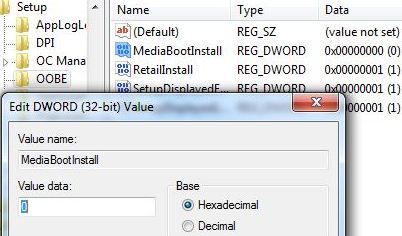
Alternatively, just download and execute MediaBootInstall.reg to merge the value into registry.
- Open an elevated command prompt as administrator.
- Run the command below to reset Windows 7 activation status:
slmgr -rearm
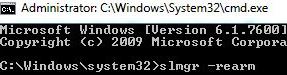
- Reboot the computer.
- Run the Activate Windows utility (accessible from bottom section ofControl Panel -> System and Security -> System, or type Activate Windows into Start Search), type in the upgrade product key and activate Windows.
Tuesday, December 29, 2009
nasty spaces in paths
This works pretty well:
But I admit I don't get the $1=$1.
tcsh, etc:
foreach file (`find , -name "* *"`)
mv "$file" "`echo $file | awk 'BEGIN {OFS="-"} $1=$1'`"
end
bash, etc:
find . -name "* *"|while read file
do
mv "$file" "`echo "$file"| awk 'BEGIN {OFS="-"} $1=$1'`"
done
But I admit I don't get the $1=$1.
tcsh, etc:
foreach file (`find , -name "* *"`)
mv "$file" "`echo $file | awk 'BEGIN {OFS="-"} $1=$1'`"
end
bash, etc:
find . -name "* *"|while read file
do
mv "$file" "`echo "$file"| awk 'BEGIN {OFS="-"} $1=$1'`"
done
Wednesday, December 23, 2009

Wednesday, December 16, 2009
My Current Favorite TED Talk
Jonathan Haidt on the moral roots of liberals and conservatives. (or: Why Everyone Wants To Go To Applebee's; Just No One You Know.)
A very interesting talk. Significantly outside the box. Interesting approach to the following:
A very interesting talk. Significantly outside the box. Interesting approach to the following:
- Evolution of morality.
- How can morality be usefully parsed?
- What is morality good for?
Subscribe to:
Posts (Atom)

 Posts
Posts

